Search The JARVEE Knowledge Base
Creating a marketing strategy for your social media profiles can be a daunting task, with so many questions, decisions, and options to consider. However, the most important aspect of this difficulty is choosing the most effective strategy for attracting and encouraging your target audience to follow you.
JARVEE’s Reblog tool is a powerful way to grow and maintain an active Tumblr account. By automatically reblogging content from targeted blogs or tags, it helps keep your feed fresh, consistent, and relevant to your niche. This increased activity can boost your visibility, attract more followers, and encourage engagement from the Tumblr community—all while saving you time from manual reblogging.
Using the Tumblr Reblog tool
From the TOOLS page, select the Reblog tool from the left sidebar. The tool has three subtabs: Settings, Sources, and Results.
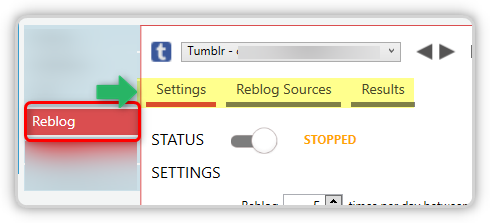
Settings
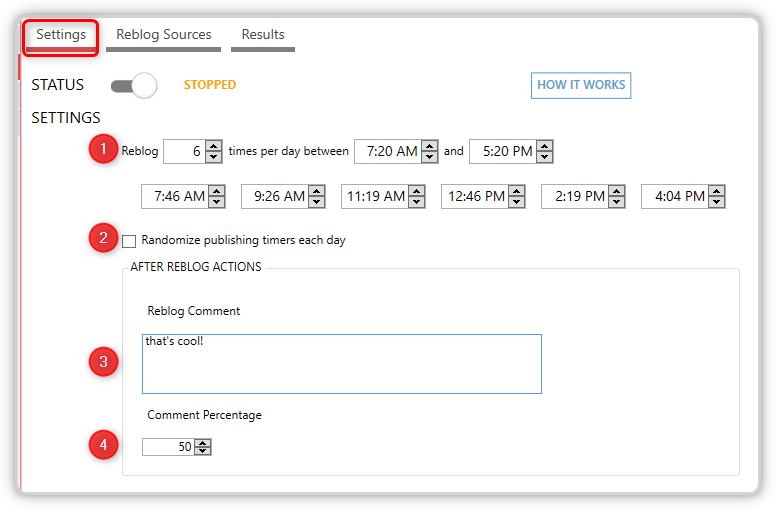
- Specify how many times you want the tool to reblog per day, as well as the hours of operation during which it will run. There are also timers allowing you to define specific times to determine when to perform reblog operations.
- You can randomize publishing timers each day
- This is optional; you can add your comment after the reblog, using the text box provided.
- Set the percentage of your comments following reblog actions; if you want to include comments after all reblog actions, set the percentage to 100%. If you have it at 50% with 6 reblogs daily, only 3 of them will have reblog comments.
Sources
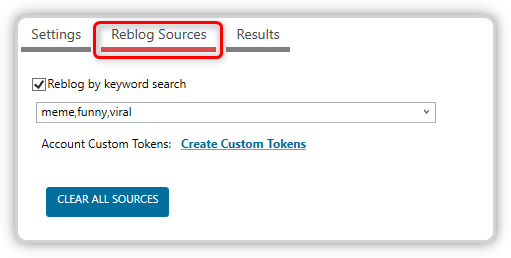
There’s only one source available—reblog by keyword search. For multiple keywords, enter your keywords separated by commas, and JARVEE will randomly use one for each operation. Use the CLEAR ALL SOURCES button should you wish to delete all keywords at once.
Results
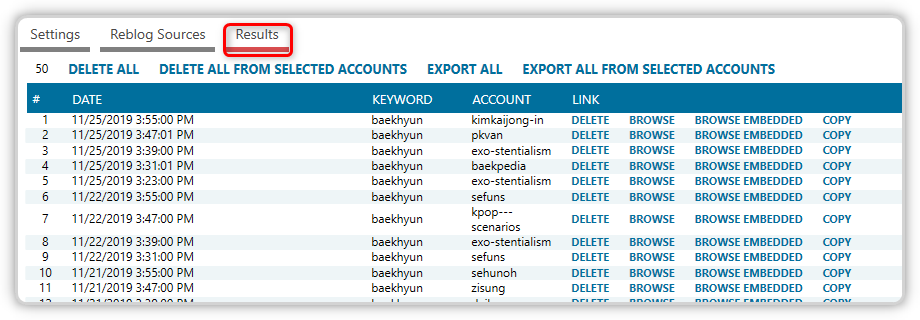
This is where the reblogged items will be listed. Along with it are the keywords used, from which account the post originated, and action buttons such as DELETE, BROWSE, BROWSE EMBEDDED, and COPY.
Interactions