Managing Multiple Instagram Accounts: My SMTasker Phone Automation Review
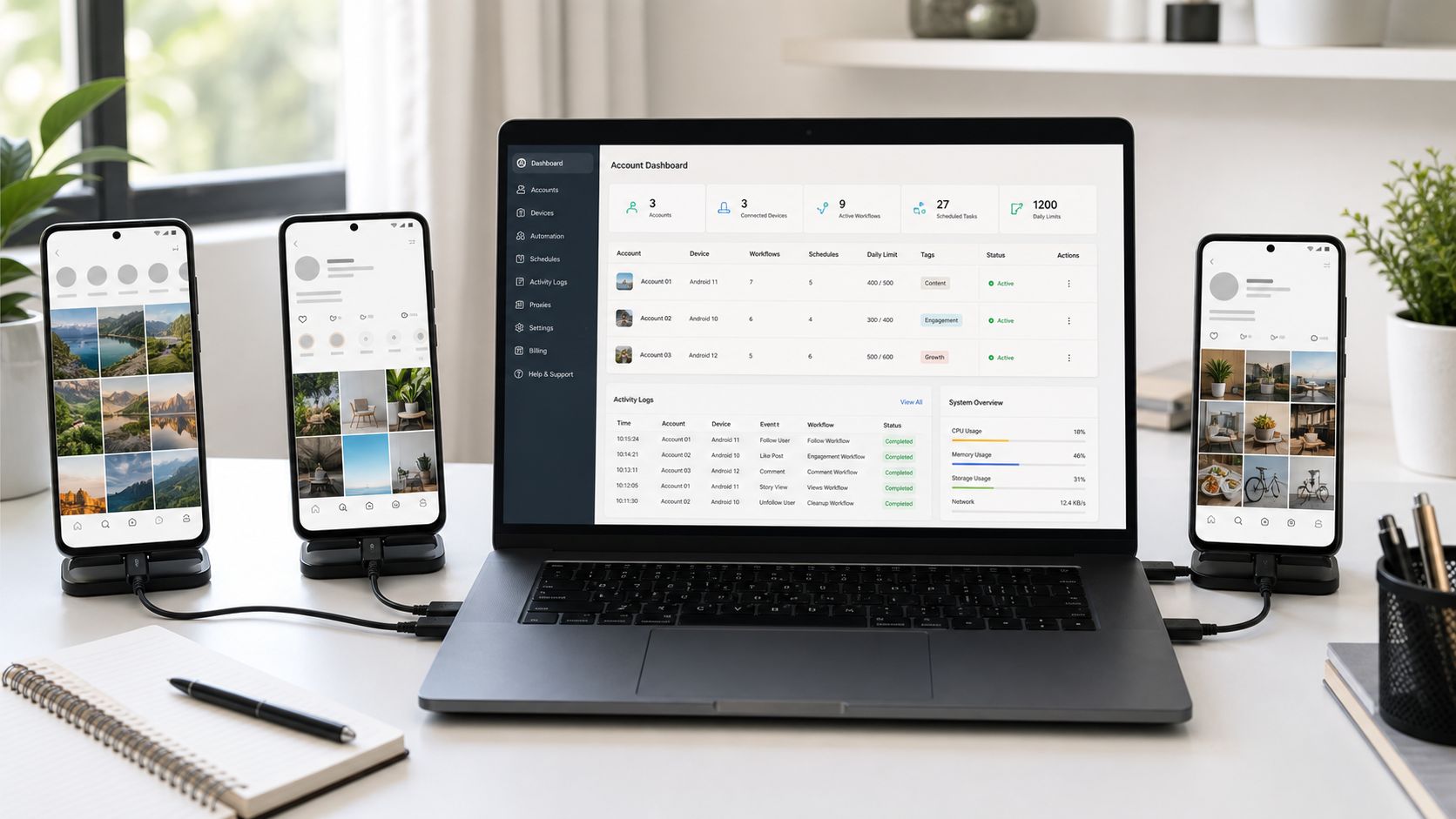
Managing one Instagram account can already take a lot of time. Managing several accounts is a different problem. I used to jump between phones, check notes, look at spreadsheets, and repeat the same small actions on every profile. It was not difficult work, but it never seemed to end.
I started using SMTasker for Instagram phone automation because I wanted one place to control those repeated tasks. I had seen many tools described as an Instagram bot, growth bot, auto like bot, or follow bot. Most of them focused on the action itself. SMTasker was more useful to me because it also helped organize the accounts, phones, schedules, sources, and logs around those actions.
The biggest result was simple: I got several hours of my week back. I still decide what content to post, which audience to target, and when a real person should answer. The tool handles the clicks and checks I do not need to perform by hand every day.
My Problem Was Not One Account
With one account, it is possible to remember most things. I know what I posted, which source I used, and whether I followed or unfollowed people that day.
That memory stops working when there are several accounts. Each profile has a different niche, posting plan, audience source, and daily routine. One account may need Story Viewer and light likes. Another may need follows and cleanup. A third may be focused on Reels, comments, saves, or publishing.
Before SMTasker, I was doing short manual rounds many times per day. I would unlock one phone, open Instagram, switch accounts, check a list, perform some actions, and write down what I had done. Then I would repeat the same process for the next profile.
The worst part was context switching. Even when each round took only 15 or 20 minutes, it broke up the rest of my work. I could not stay focused on content, research, or clients because there was always another account to check.
Why Instagram Phone Automation Made Sense to Me
SMTasker runs the Instagram work through connected Android phones or Android emulators. I manage the setup from a web dashboard, but the device performs the actions inside the app.
The device connection is based on the same general Android communication model described in Google’s Android Debug Bridge documentation. I did not need to become an Android developer to use the product. What mattered to me was that every account could be tied to a clear phone or emulator and that I could see which device was online.
This was easier for me to understand than a hidden cloud bot. If an account had a problem, I knew which device it belonged to. If a phone went offline, the dashboard showed which automations were affected. I did not have to guess where the account was running.
Some people may call this a real phone Instagram bot. Others may call it Android Instagram automation or device-based automation. The name is less important than the workflow. The account, device, task, limits, and logs stay connected in one system.
The Features That Saved Me the Most Time
SMTasker has many Instagram tools, but a few features made the biggest difference for multi-account work.
One dashboard for accounts, devices, and bots
The Automations dashboard became the page I checked first. Each row shows a tool running on one account. I can see the tool name, platform, account, connected device, tags, current status, and how many actions it completed that day.
This sounds basic, but it removed a lot of uncertainty. I no longer had to open every Instagram account just to see whether a Like bot, Follow bot, Story Viewer, or Publish task had run.
The “Actions Today” number is especially useful. If one tool shows zero actions during its active time, I know it needs attention. If the number looks normal, I can move on without opening the phone.
Tags and filters for client groups
Tags helped me separate accounts by client, niche, campaign, or priority. For example, I could tag several accounts for one campaign, then filter the dashboard and see only those automations.
This is much faster than scrolling through a long list. It also reduces mistakes. I am less likely to edit the wrong follow bot or pause the wrong client’s Story Viewer when the dashboard is filtered to one clear group.
Copy Settings
Copy Settings is one of the features I did not expect to use as much as I did. When I build a useful setup for one account, I can copy that tool’s settings to another matching tool.
It can copy the basic structure, such as sources, limits, and Active Days, without making me rebuild everything from zero. I still review the settings for each account because clients have different needs. Even so, starting from a working template is much faster than entering the same information again and again.
For an agency or anyone running a small account network, this feature alone can save a surprising amount of setup time.
Active days, limits, and schedules
I did not want every account running every bot all day. SMTasker lets me choose active days, operating hours, hourly ranges, daily limits, delays, and pauses for each tool.
This means I can give each account its own routine. A newer account can start with simple viewing and light likes. An older account can use a larger but still controlled schedule. Comments and contact tasks can run less often than passive Story Viewer or Reel Viewer activity.
The controls also make the system easier to review. When an account does more activity, it is because I changed a clear setting, not because a black-box bot decided to increase the volume.
Live logs
Logs saved me from checking every phone. I can review what ran, which source was used, what was skipped, and where a task stopped.
This is useful when managing multiple Instagram accounts because small problems are easy to miss. A weak source can waste actions. A disconnected device can stop several tools. A login problem can make one account look inactive. The logs give me a place to start instead of making me investigate everything.
The Instagram Bots I Actually Use
I do not switch on every tool for every account. I choose the bot or automation that matches the goal of that profile.
- Like bot: useful for light engagement around relevant accounts and content sources.
- Follow and unfollow bot: helps organize targeted follows and later cleanup without keeping manual lists.
- Story Viewer bot: useful for steady, low-touch viewing around selected sources.
- Reel Viewer bot: helps keep viewing activity focused on Reels in the right niche.
- Save Posts and Like Comments: smaller actions that can support research and engagement routines.
- Comment bot: useful only when prompts and targets are reviewed carefully.
- Contact or DM automation: useful for selected outreach lists and routine messages, while important replies still go to a person.
- Publish tool: keeps media folders, captions, and posting windows in the same workflow as the account activity.
Calling these features bots does not bother me. They are bots in the simple sense that they repeat actions automatically. The important difference is whether the operator can control them.
With SMTasker, I can choose the source, set the limits, stop one tool, and keep another running. It feels less like a blind bot farm and more like a dashboard for work I already understand.
A Typical Day After Setting It Up
My daily routine is much shorter now.
I open the dashboard and filter by the accounts I want to review. I look at connected devices, active tools, and Actions Today. If something is at zero or a device is offline, I check the logs. If everything looks normal, I do not open each phone.
Then I check publishing and any tasks that need human judgment. I review comments, DMs, client messages, and content. These are the parts where my time has more value.
At the end of the week, I compare sources and remove weak ones. I also check whether a copied setup needs different limits for a specific account. This review takes far less time than repeating the actions manually all week.
What I Would Recommend to a New User
Start with one phone, one Instagram account, and one simple bot. A Like bot, Story Viewer, or Reel Viewer is easier to understand than a large setup with every action enabled.
Choose one relevant source and set modest limits. Let the task run, then read the logs. Once that workflow is easy to supervise, add a second account or another tool.
For multiple accounts, use clear names and tags from the beginning. Keep client sources separate. Do not copy settings and forget about them. Copy the useful structure, then adjust it for the new account.
I would also keep comments and DMs more controlled than likes or views. A machine can perform the action, but message quality still represents the account.
Who I Think SMTasker Is Best For
SMTasker makes the most sense for:
- social media managers handling several Instagram profiles;
- small agencies running daily engagement for clients;
- creators or brands with more than one niche account;
- operators using Android phones or emulators;
- people who understand Instagram growth but are tired of repetitive clicks;
- anyone who wants an Instagram bot with visible settings and logs.
It is not a replacement for content, targeting, or customer service. I use it because it gives me more time for those things.
My Final Review
SMTasker has made managing multiple Instagram accounts much easier for me. The main win was not one auto-like or auto-follow feature. It was putting accounts, phones, bots, limits, sources, schedules, publishing, and logs in one place.
I spend less time switching devices and checking whether routine actions happened. I also make fewer setup mistakes because accounts can be grouped with tags and every automation shows its device and status. Copy Settings saves time when I add a similar workflow, while live logs tell me where to look when something needs attention.
If you are searching for Instagram phone automation, a multi-account Instagram bot, or a tool for running several client profiles, I recommend trying SMTasker. It is simple enough to start with one phone, but structured enough to grow into a serious multi-account workflow.
For me, it turned Instagram automation from a pile of repeated actions into a system I could actually manage.
Nidm says
Interesting review! Managing multiple Instagram accounts can be challenging, so automation tools that simplify scheduling and account management can be really useful for marketers.